The Lenovo M720q as a homelab server: what it can handle

I've run Lenovo M720q and M920q units in my homelab, along with Dell and HP mini PCs. The M720q is the one homelab folks recommend most, and it's easy to see why: it's small, quiet, cheap to run, and it has a trick most mini PCs don't, a real PCIe slot. Here's what it can handle and how to set one up.
Short answer
- Yes, it's a great homelab box. One M720q with a 6-core Core i5 and 32 GB of memory runs Proxmox with a handful of VMs and containers without breaking a sweat.
- Buy: an i5-8500T or i5-9500T, 16 GB or more, an NVMe SSD, and the power brick.
- The catch: one built-in network port, and the PCIe slot needs a riser card that used units often don't include.
Why the M720q
The ThinkCentre M720q is a business desktop about the size of a hardcover book, built in 2018 and 2019 to bolt onto the back of an office monitor. Companies are retiring them in bulk now, so they're easy to find used. Any of the Lenovo, Dell, or HP mini PCs make a good server, but the M720q stands out for three reasons:
- 8th and 9th-gen Intel processors, including 6-core models, which are plenty for a small server.
- Low power. About 11 to 14 watts at idle, per ServeTheHome's measurements. More on that in my tiny PC guide.
- A PCIe slot. With a riser card, it takes a low-profile expansion card, most often a 2- or 4-port network card. That's why it shows up in so many home router builds.
What's inside
| Processor | 8th or 9th-gen Intel, from Celeron and Pentium up to Core i7 and i9 "T" chips (35 watts) |
|---|---|
| Chipset | Intel B360 |
| Memory | Two DDR4-2666 SODIMM slots, 32 GB official maximum |
| Storage | One M.2 slot for a 2242 or 2280 NVMe SSD (PCIe 3.0), plus one 2.5-inch SATA bay |
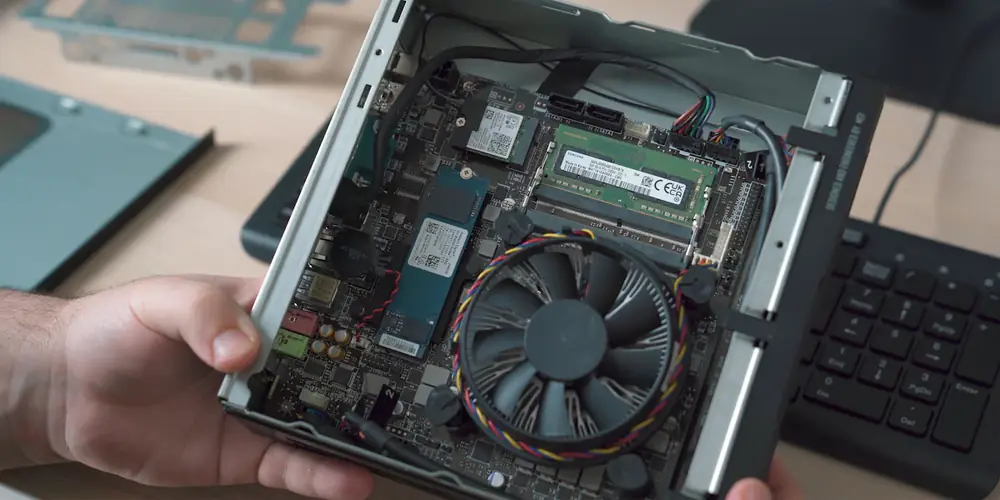
| Expansion | One PCIe 3.0 x8 slot for a low-profile card, through a riser. It uses the space of the 2.5-inch bay, so it's one or the other |
| Network | One gigabit port (Intel I219-V), plus an M.2 slot for an optional Wi-Fi card |
| Video | HDMI and DisplayPort |
| Power | External adapter: 65, 90, or 135 watts depending on the configuration |
Skip the Celeron and Pentium versions. The i5-8500T or i5-9500T (6 cores) is the value pick. An i7 adds threads and heat but rarely matters for home use.
What it can handle
With a 6-core i5, 32 GB of memory, and an NVMe SSD, one M720q comfortably runs:
- Proxmox with a few Linux VMs and a dozen or so LXC containers.
- Docker apps like a dashboard, file sync, photo backup, or a password manager.
- Network services: DNS and ad blocking (I run AdGuard Home; Pi-hole does the same job), a VPN like WireGuard or Tailscale, and a reverse proxy.
- A media server like Jellyfin or Plex. The built-in Intel graphics can convert video on the fly with Quick Sync, which uses far less power than doing it on the processor.
- A router or firewall with OPNsense or pfSense, once you add a multi-port network card in the PCIe slot.
What it won't do well: hold a lot of big hard drives. There's room for one NVMe and one 2.5-inch drive (or the PCIe card), and that's it. For bulk storage, pair it with a NAS, which is what I do on my three-node Proxmox cluster, or a USB drive enclosure for backups.
Memory, storage, and PCIe upgrades
Memory
Two laptop-size DDR4 slots. Lenovo's official maximum is 32 GB (two 16 GB sticks), and plenty of owners report 64 GB working with two 32 GB sticks. For Proxmox, 32 GB is the sweet spot. For Docker on one Linux install, 16 GB goes a long way. Check current prices on my RAM price tracker. Used DDR4 laptop memory is a good way to save.
Storage
Put the operating system and VMs on an NVMe SSD in the M.2 slot. Lenovo's hardware maintenance manual shows where it is and how to get to it. Use the 2.5-inch bay for a second SATA SSD or hard drive if you don't need the PCIe slot. Many off-lease units come with a small 128 GB or 256 GB NVMe drive, or none at all.
The PCIe slot
This is the M720q's party trick, and it trips people up. To use it you need:
- A Lenovo riser card that plugs into the board and turns the slot sideways. Search for "M720q PCIe riser" and match the part number to your model's hardware maintenance manual.
- A rear bracket that replaces the blank cover on the back.
- A low-profile card that fits the short space, like an Intel I350 2-port or 4-port network card.
- Enough power. Lenovo sells the M720q with 65, 90, and 135-watt adapters. ServeTheHome noted a 4-port network card build needs the 135-watt adapter, so check what your card draws.
The card sits where the 2.5-inch drive would go, so you give up that bay.
Setting it up for Proxmox
- Update the BIOS from Lenovo's support site while Windows is still on it, if it came with Windows. It's easier than doing it later.
- Restart and press F1 to open the BIOS. Make sure Intel Virtualization Technology and VT-d are on. They're usually on already.
- Set After Power Loss to Power On, so it comes back by itself after an outage.
- Write the Proxmox installer to a USB stick, boot from it (F12 for the boot menu), and install to the NVMe drive.
- Give it a fixed IP address, either in the installer or as a reservation on your router.
From there it's regular Proxmox. When you want a second box, add another M720q or M920q rather than something bigger. Three of them make a proper Proxmox cluster.
The network port hang, and the fix
The one well-known problem: the built-in Intel I219-V port can stop responding under heavy traffic, with e1000e ... Detected Hardware Unit Hang in the logs. It's a driver issue shared by many Intel desktop network chips, and the Proxmox forums are full of it. The usual fix is to turn off some offloading features on the port:
ethtool -K eno1 tso off gso off gro off
To keep it after a restart, add a post-up line under the port in /etc/network/interfaces on the Proxmox host. Your port name may differ from eno1; ip link shows it.
iface eno1 inet manual
        post-up ethtool -K eno1 tso off gso off gro off
If you never see the error, you don't need this. It usually shows up during big transfers like backups.
Buying one used
- Check the processor. "Core i5" in a listing could mean a 4-core i5-8400T or a 6-core i5-8500T. Both work, but the 6-core is worth a few dollars more.
- Check for the power brick. It's a laptop-style Lenovo adapter with a rectangular tip. Many listings leave it out.
- Check for a drive. Off-lease units often ship without one. That's fine if the price reflects it.
- Want the PCIe slot? Ask if the riser and rear bracket are included. They're sold separately if not.
- Look for a BIOS password or "managed by your organization" message, like any used business PC.
I track used mini PC prices on my personal site: small Proxmox-ready PC price tracker. The M920q is the same box with Intel's business chipset and vPro remote management on some processors. For a homelab, buy whichever is cheaper. The tiny PC guide compares the Dell and HP equivalents.
M720q questions
Is the Lenovo M720q good for a homelab?
Yes. It's one of the most popular used mini PCs for a homelab. It runs Proxmox, Docker, and network services on about 11 to 14 watts at idle, takes up to 32 GB of memory officially, and has an NVMe slot, a 2.5-inch drive bay, and an internal PCIe slot.
How much RAM can the M720q take?
Lenovo lists 32 GB of DDR4-2666 in two laptop-size (SODIMM) slots. Many owners report running 64 GB with two 32 GB sticks, but that's beyond Lenovo's official spec.
Does the M720q have a PCIe slot?
Yes. It has an internal PCIe 3.0 x8 connector for one low-profile card, usually a network card. You need a Lenovo riser card and a rear bracket, which are often missing from used units, and the card takes the place of the 2.5-inch drive bay.
Can the M720q run Proxmox?
Yes. Its 8th and 9th-gen Intel processors support the virtualization features Proxmox needs. The one common snag is the built-in Intel I219-V network port, which can drop out under heavy traffic until you turn off some offloading features.
What is the difference between the M720q and the M920q?
They're the same size and layout. The M920q uses Intel's business chipset with vPro remote management on some processors. For a homelab, they're close enough that you can buy whichever is cheaper.