Tiny PCs: Lenovo ThinkCentre Tiny, Dell OptiPlex Micro, and HP Mini

I keep a handful of off-lease mini PCs around. I've run Lenovo Tinys, Dell OptiPlex Micros, and HP Minis in all kinds of setups, and right now they handle my homelab and network services. They're quiet, they sip power, and businesses retire them by the pallet.
What to buy
- Best all-around: Lenovo ThinkCentre M720q or M920q. 8th or 9th-gen Intel, and a PCIe slot for a network card.
- Just as good without the slot: Dell OptiPlex 7060 or 7070 Micro, or HP EliteDesk 800 G4 or G5 Mini.
- Sweet spot: a 6-core Core i5 (like the i5-8500T or i5-9500T), 16 GB of memory, and an NVMe SSD. Make sure the power brick is included.
Why these little PCs are so good
Lenovo, Dell, and HP all make a business desktop about the size of a hardcover book, meant to bolt to the back of a monitor in an office. Companies buy them by the thousand and replace them every few years, so the used market is full of them.
They have laptop-style parts inside (low-power "T" processors, laptop memory, an external power brick) but desktop-style ports and cooling. That combination makes them great for anything that runs around the clock. The tech site ServeTheHome nicknamed the category TinyMiniMicro, after the three brand names, and the homelab world has been buying them up ever since.
I'll admit my Lenovo bias here, but I've used all three brands and any of them is a good buy. The differences are smaller than the forum arguments suggest.
The models, by generation
The processor generation matters most. 8th-gen Intel and newer runs Windows 11 officially and has 6-core options. Older ones are fine for Linux and light server work.
| Generation | Lenovo ThinkCentre | Dell OptiPlex Micro | HP Mini |
|---|---|---|---|
| 6th/7th gen Intel (2016-2017) | M700, M900, M710q, M910q | 3050, 5050, 7050 | EliteDesk 800 G2/G3, ProDesk 400/600 G2/G3 |
| 8th/9th gen Intel (2018-2019) | M720q, M920q | 3060, 5060, 7060, 7070 | EliteDesk 800 G4/G5, ProDesk 400/600 G4/G5 |
| 10th gen Intel (2020) | M70q, M80q, M90q Gen 1 | 3080, 5080, 7080 | EliteDesk 800 G6, ProDesk 400/600 G6 |
| AMD Ryzen | M75q | EliteDesk 805 G6 Mini |
Within a model, the processor ranges from a Celeron or Pentium up to a Core i7. Skip the Celeron and Pentium versions. A Core i5 is the best value, and a Core i7 mostly adds heat.
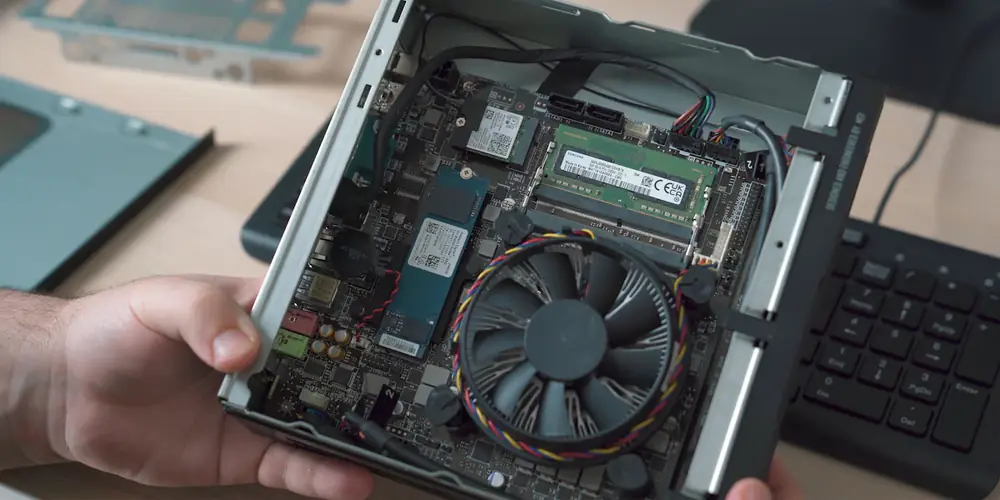
What fits inside
- Memory: two laptop-size (SODIMM) slots. 8th and 9th-gen models are officially rated for 32 GB, and plenty of owners run 64 GB.
- Storage: most have one M.2 NVMe slot plus a bay for a 2.5-inch SATA drive, so you can run a fast boot drive and a bigger storage drive side by side.
- PCIe slot: this is the Lenovo M720q and M920q's party trick. With the right riser card and bracket, they take a low-profile card, most often a 2- or 4-port network card for a router build. The riser is a separate part and often missing from used units.
- Extra ports on HP: many EliteDesk and ProDesk Minis have a "Flex IO" spot where you can add a module like an extra video output or a serial port.
Lenovo publishes a hardware maintenance manual for each Tiny, and Dell and HP publish service manuals for theirs. Search the model plus "maintenance manual" before you buy parts.
What they cost to run
This is the big reason they took over the homelab world. ServeTheHome measured about 11 to 14 watts at idle on an M720q and 12 to 15 watts on a quad-core M920q.
| Running 24/7 | Idle power | Per year at 15.7¢/kWh |
|---|---|---|
| Lenovo M720q / M920q | about 12-15 W | about $17-21 |
| Typical older desktop tower | about 40-60 W | about $55-85 |
| Old 2U rack server | often 100-200 W | about $140-275 |
If you're weighing an old enterprise server against a couple of these, I wrote about that too: is an old server worth running at home? I scrap a lot of those servers, and for most people the answer is no.
What I use them for
Mine run my homelab and network services. Some jobs these little boxes handle well:
- Proxmox for running several virtual machines and containers on one box. A 6-core i5 with 32 GB goes a long way, and a few of them make a nice Proxmox cluster.
- Docker for self-hosted apps: file sync, photo backup, dashboards, and so on.
- Pi-hole or AdGuard Home for network-wide ad blocking, and a VPN like WireGuard to reach home from anywhere.
- Home Assistant for smart-home control.
- A router or firewall with OPNsense or pfSense, using an M720q or M920q with a multi-port network card in the PCIe slot.
- A media server like Plex or Jellyfin. The Intel graphics built into these processors can convert video on the fly with very little power.
New to this? Start with my guide to turning an old PC into a home server. One box can do several of these at once. When you outgrow it, add a second one instead of buying something bigger. Two or three Tinys still use less power than one old server.
Buying one used
- Check for the power brick. A lot of listings don't include one. Lenovo Tinys use a laptop-style adapter, and the wattage matters: ServeTheHome saw an M920q throttle on a 65-watt adapter instead of its 90-watt one.
- Check the exact processor. "Core i5" can mean anything from 6th to 10th gen. The model number after the dash tells you: i5-8500T is 8th gen.
- Check for a drive. Many off-lease units ship without one. That's fine if the price reflects it.
- Want the PCIe slot? On a Lenovo, make sure the riser card and rear bracket are included, or budget for them.
- Look for a BIOS password or "managed by your organization" messages, just like any used business PC.
I track used mini PC prices on my personal site: small Proxmox-ready PC price tracker. For one specific model and processor, eBay's sold listings show what it actually sells for. Local recyclers and Facebook Marketplace can be cheaper, and you can see it boot before you pay.
As an everyday desktop
They're not just for tinkerers. An 8th-gen or newer mini PC with an SSD and 16 GB of memory is a great home or office computer: silent, tucked behind the monitor, and able to run Windows 11. For most households it's the refurbished desktop I'd recommend first.
Tiny PC questions
What is the best used tiny PC for a homelab?
A Lenovo ThinkCentre M720q or M920q is the most popular pick, mainly because it has a PCIe slot for a network card. The Dell OptiPlex 7060 or 7070 Micro and HP EliteDesk 800 G4 or G5 Mini are just as good if you don't need the slot. Look for an 8th-gen or newer Intel Core i5.
How much power does a Lenovo Tiny use?
ServeTheHome measured about 11 to 14 watts at idle on an M720q and 12 to 15 watts on a quad-core M920q. Running one around the clock costs roughly $17 to $21 a year at typical Kansas electricity rates.
Can a ThinkCentre Tiny run Windows 11?
Models with an 8th-gen Intel processor or newer, like the M720q, M920q, and later, run Windows 11 officially. Older ones like the M700, M900, M710q, and M910q don't.
How much RAM can a Lenovo M720q take?
It has two laptop-size (SODIMM) DDR4 slots. Lenovo lists 32 GB as the maximum, and many owners report running 64 GB successfully. For most homelab use, 16 to 32 GB is plenty.
What is TinyMiniMicro?
It's the nickname the tech site ServeTheHome gave to used Lenovo Tiny, HP Mini, and Dell Micro PCs when it started reviewing them as cheap, low-power homelab servers.